A First Visit to an Unfamiliar Website: A Reading Routine
Use a first-visit website reading routine to identify a site’s purpose, find useful routes, and spot confusing labels before committing to a task.
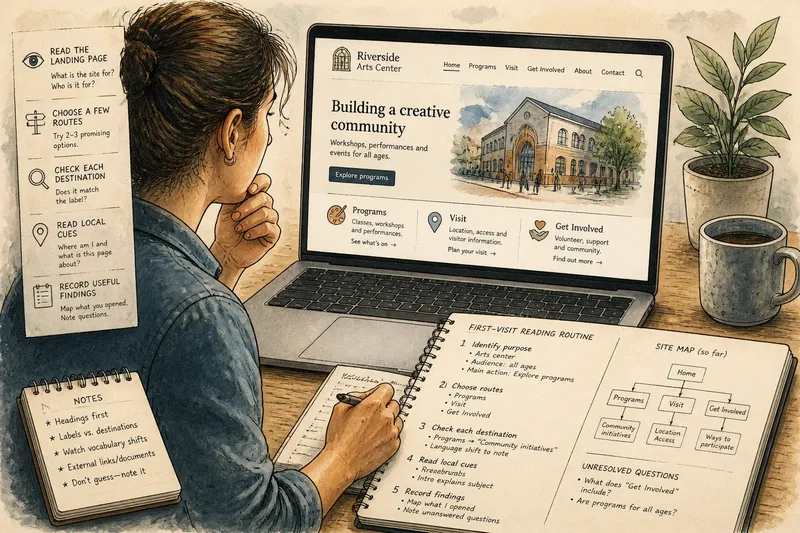
Where should you begin when an unfamiliar website leaves you unsure what to click? Use a first-visit website reading routine: identify the page’s purpose, follow a few likely routes, and check whether each destination matches its label. You can get your bearings without opening every link.
This works for a museum, public service, community organization, or small business. It is a way to understand the site, not to judge its creators. Keep notes about what the pages actually say, and leave unanswered questions open rather than guessing.
Read the landing page
Before scrolling, notice the site name, main heading, short description, and most prominent action. Ask what the organization appears to do and whom the page addresses. “Plan your visit” signals practical visitor information; “Discover more” needs help from nearby text.
If the identity is unclear, look beyond the logo. Check the organization name, contact link, location cues, and footer description. These clues can distinguish, for example, a university department from a city program with a similar visual style.
Separate the main message from decoration. A large photograph can set a mood without explaining a service, and a carousel can push practical information out of view. Read the heading and its nearby copy first.
Write one tentative sentence about the site’s purpose, such as “This site seems to help residents find local services.” If the page does not support a simple description, note that uncertainty instead of filling it with assumptions.
Choose a few routes
Scan the primary navigation and note its top-level labels, order, and menu controls. Labels such as “About,” “Services,” and “Events” are only useful when the pages behind them fit a visitor’s needs. “Resources” might mean forms, articles, or outside links.
Pick two or three promising routes. Open each, read its page title and introductory text, then return using the browser’s back button or the site navigation. A small sample is enough to see how the site organizes information.
Notice where search, account access, location selection, and help appear. Search is useful when you already have a specific term. If you are still learning the site’s vocabulary, the navigation may reveal categories you would not know to type.
Check each destination
Compare a route’s label with the destination’s heading and opening text. The wording need not be identical: “Get help” can lead to “Support options” if the page clearly explains how to get help. What matters is whether you can recognize the connection.
Watch for vocabulary shifts that obscure that connection. A menu item called “Services” might lead to “Programs,” then a list of “initiatives.” Those terms may be reasonable, but the page should make clear that you have arrived in the right place.
Say you visit an unfamiliar neighborhood arts center’s site to learn what it offers. The home page features “Get involved,” while the menu has “Programs.” You open “Programs” and see a page headed “Community initiatives,” with workshops and performances listed below. The list suggests you have found activity information; the change from “Programs” to “Community initiatives” is worth noting because it makes the route harder to recognize.
Read local cues
A page title, breadcrumb trail, selected menu item, or section heading can show where you are in the site. These cues matter when you arrive from a search result or a link someone shared rather than from the home page.
Check whether the page explains its subject and audience. “Eligibility” may be clear beneath a service name, but feel incomplete if you land directly on it. A short introduction should give enough context to understand the page without piecing together fragments elsewhere.
Distinguish navigation from content. A sidebar may lead to neighboring topics, while the main column explains the current one. Tabs may switch between parts of a service. If the labels and headings do not make those roles clear, note what you could not tell.
Also notice when a route leaves the site or opens a document. “Download the application” sets a different expectation from a link that appears to lead to a regular page. The destination title and surrounding explanation can clarify whether you are opening a PDF, an account area, or an external service.
When should you continue?
What if the home page has no clear purpose?
Check the organization name, page description, and main headings for a consistent subject. If they still point in different directions, open a likely “About” or contact page and leave the purpose unresolved if the language remains broad.
What if a menu label seems wrong?
Read the destination heading and opening text before deciding the route failed. If the page does not explain the connection, note the label and destination wording rather than guessing what the site intended.
Should you use site search first?
Use search when you have a specific subject, especially after seeing how the site names its sections. For a first look, navigation can expose categories you might not think to search for.
What if there is no clear way back?
Try the browser’s back control, then look for a home link, breadcrumb, or recognizable menu. If you return through a search result, reread the page title and opening text before continuing.
Record useful findings
Write a compact map using only pages you opened: “Home introduces the center; Programs lists activities; Visit covers location and access; Contact gives staff details.” Add unresolved questions separately, such as “Does ‘Get involved’ mean volunteering, donations, or both?” You can follow up only if the answer matters to your task.
If comparing sites for the same purpose, use the same observations for each: how clearly it states its purpose, which routes it presents, and whether the destinations fulfill their labels. A polished landing page can still leave route names unclear; a plain page can provide direct access with useful labels.
The first-visit website reading routine works best when your notes stay close to the evidence: what a heading says, where a route leads, and whether the page explains the connection. That gives you a precise next question without turning a brief orientation into an inventory of the whole site.